You Don’t Need an Expensive Studio to Create Good Content
Let’s just get this out of the way first: you don’t need a $3,000 camera setup, and you definitely don’t need a dedicated studio, to produce videos that look polished and professional on YouTube, TikTok, Instagram, or wherever else you’re putting your content out into the world.
Here’s a misconception I see beginners fall into constantly: they assume the camera is the most important piece of the puzzle. They save up for months, finally buy a fancy camera, and then feel confused when their videos still look kind of off. The truth is, the camera is rarely the actual problem.
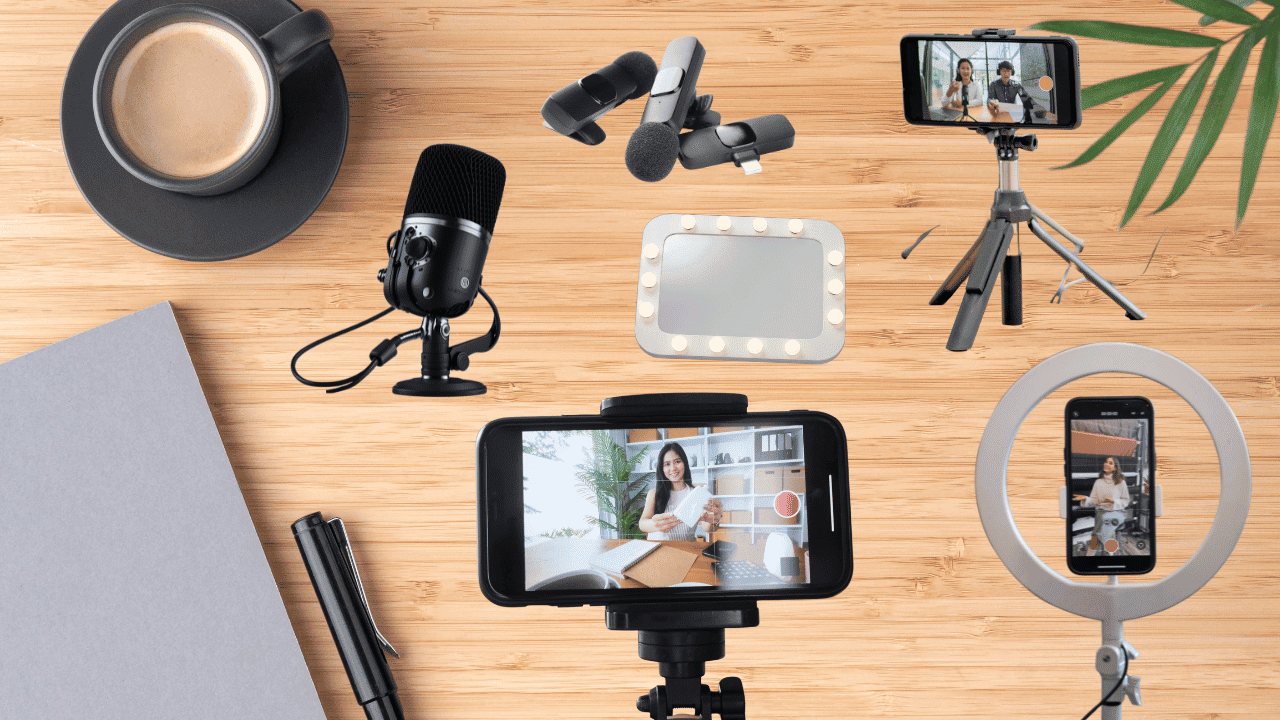
A good creator setup really comes down to getting a handful of fundamentals right: clear and clean audio, good and flattering lighting, stable camera positioning, and a workspace that actually makes creating easier instead of harder. That’s it. That’s the whole secret, and it’s honestly a relief once you realize it.
So instead of trying to buy everything at once (which usually means overspending on the wrong things), you can build a genuinely capable creator setup one inexpensive upgrade at a time.
In this article, I’ve rounded up 10 useful creator tools that all cost $50 or less, with options for different types of creators, different shooting environments, and different budgets. Grab your coffee and let’s get into it.
How We Chose These Creator Tools
Before we dive into the actual recommendations, I want to be upfront about the criteria I used to put this list together, because I think it matters.
Every product on this list needed to check most, if not all, of these boxes:
- Costs $50 or less at the time of publication
- Has consistently strong customer ratings and reviews
- Is genuinely beginner-friendly, not something that requires a manual to figure out
- Solves a specific, real content-creation problem
- Works with smartphones whenever possible
- Doesn’t require a complicated setup or extra expensive equipment to function
- Comes from an established, reputable brand where possible
- Offers a meaningful improvement over just using whatever you already own
One quick note before we move on: prices fluctuate all the time, especially with gear like this, so treat everything listed here as approximate rather than gospel. Always double-check the current price before you buy.
Start With Audio: 3 Affordable Microphones
Here’s something worth sitting with for a second: you can get away with imperfect video a lot more easily than you can get away with audio that’s hard to understand.
People will forgive shaky footage or slightly off lighting, but if they can’t make out what you’re saying, they’re gone within seconds.
For talking head videos, tutorials, podcasts, interviews, UGC, and vlogs, upgrading your microphone can honestly make a bigger difference than immediately jumping to a camera upgrade. So let’s start here.
1. Best Dynamic Podcasting Mic: Audio-Technica AT2100x-USB
- Approx. price: ~$48
- Best for: Desk-based YouTube videos, podcasts, voiceovers, and talking-head content
What makes it great is that it offers both USB and XLR connectivity, so it’s useful whether you’re just starting out or you already have a slightly more advanced setup you’re plugging it into. It also has good background noise rejection, which matters more than people expect until they hear their first recording without it.
The one drawback worth mentioning is that it’s less convenient for creators who need to move around while recording, since it’s really designed for a stationary setup. It works well with laptop and desktop setups, and with compatible mobile setups too.
We recommend it because it’s a versatile microphone that can stay useful even as your setup gets more sophisticated over time, which means you’re not going to outgrow it in six months.
2. Best Compact On-Camera Mic: Deity V-Mic D4 Mini
- Approx. price: ~$50
- Best for: Vloggers, travel creators, and creators filming directly from a camera or phone
It’s tiny, lightweight, and doesn’t need a battery, which is honestly such a nice thing not to have to think about. It’s also easy to mount and was clearly designed with portable setups in mind from the start.
The drawback here is that it’s not going to be the right choice for every phone or camera configuration, so it’s worth checking compatibility before you buy. We recommend it because it’s such a simple way to improve your on camera audio without adding a bulky microphone that gets in the way of your shot.
3. Best Budget Wireless Lavalier
- Approx. price: $22 to $50
- Best for: TikTok, Reels, UGC, GRWM, tutorials, fitness, and walking videos
This category is best for TikTok, Reels, UGC, get-ready-with-me videos, tutorials, fitness content, and anything where you’re walking around while filming. The whole appeal is hands-free recording with an easy clip-and-go setup that lets you move away from the camera without losing your audio quality.
The drawback with budget wireless systems in general is that quality and reliability can vary quite a bit from brand to brand, so it’s worth reading recent reviews before committing.
Compatibility is also something to pay close attention to here: make sure you know whether you need something that works with iPhone, Android, USB-C, Lightning, or a dedicated camera, since these systems aren’t always interchangeable.
We recommend this option because it’s ideal for creators who don’t want to stay glued to a desk or stand frozen directly in front of the camera the whole time.
Upgrade Your Lighting: 3 Budget-Friendly Lights
Before you spend hundreds of dollars on a new camera, try something cheaper first: improve the light around the camera you already own. It sounds almost too simple, but better lighting can make smartphone footage look dramatically cleaner, more flattering, and more intentional, sometimes to the point where people assume you upgraded your camera when really you just fixed your lighting.
4. Best Portable LED Panel: Reno Bi-Color LED Video Light
- Approx. price: ~$38
- Best for: creators who film in different locations and need something that travels well.
It’s compact, has adjustable color temperature so you can match different environments, and is bright enough for small shooting spaces. It also comes with a mini tabletop stand, which is a nice touch for anyone who doesn’t want to buy a separate light stand right away.
The drawback is that smaller panels like this may not provide enough coverage if you’re working in a larger room. We recommend it as a practical first light for creators who don’t have much space to work with, since it does a lot without taking over your setup.
5. Best Clip-On Phone/Laptop Light: NEEWER NL-60AI
- Approx. price: ~$41
- Best for: selfie videos, video calls, tutorials, and any front-facing phone content.
It clips directly onto your device, which makes it incredibly easy to position exactly where you need it, and it provides soft fill lighting that flatters most faces. It’s honestly useful well beyond content creation too, since it makes video calls look better as a nice side benefit.
The drawback is that it’s better suited to close up shots than full body filming, so keep that in mind depending on the type of content you’re making. We recommend it as one of the easiest lighting upgrades available for creators who primarily shoot from their phone or laptop.
6. Best RGB Accent Light: SmallRig P96L / P108 RGB Panel
- Approx. price: $22 to $35
- Best for: background lighting, colorful setups, and anyone who wants to add a bit of visual flair.
It’s compact, portable, and offers a range of RGB color options that can work as an accent light, a hair light, or a background light depending on how you position it.
The drawback, and I think this is genuinely important to say, is that RGB effects matter a lot less than basic white lighting when you’re building your very first setup. It’s easy to get excited about colorful lights and forget the fundamentals. We recommend this as a fun second light once your basic lighting is already handled, not as your first purchase.
Keep Your Camera Steady: 3 Tools for Better Framing
You don’t need cinematic camera movement to make good content. What you do need is for your camera to actually stay where you put it. A stable camera also makes your framing repeatable, which saves you a surprising amount of time once you’re filming regularly and don’t want to reset your whole shot every single session.
7. Best Full-Size Tripod: ARTCISE 159cm / K&F Concept 64“ Aluminum Tripod
- Approx. price: ~$49
- Best for: talking head videos, tutorials, product photography, and full body content.
It offers full height positioning, sturdy aluminum construction, and works with both phones and cameras as long as you have the appropriate mount attached. It’s genuinely useful for both photography and video, so it pulls double duty.
The drawback is that it’s less portable than a smaller mini tripod, simply because of its size. We recommend it as the most useful option if you want one single tripod that can cover multiple shooting situations without having to buy several different ones.
8. Best Flexible/Vlogging Tripod: JOBY GorillaPod 3K / ULANZI Flexible Mini Tripod
- Approx. price: $32 to $45
- Best for: travel, vlogging, unusual camera angles, and small spaces where a full tripod just won’t fit.
The flexible legs can wrap around rails, poles, and furniture, and it’s easy to carry around, plus, it can double as a handheld grip when you need it to.
The drawback is limited height compared with a full-size tripod, so it’s not really built for standing shots at eye level. We recommend it as a versatile option for creators who prioritize portability above almost everything else.
9. Best Smart Framing Accessory: FARWAYVIEW Magnetic Selfie Mirror
- Approx. price: ~$19
- Best for: solo creators using their phone’s rear camera, which, let’s be honest, almost always takes better quality footage than the front camera.
It helps you see your framing while using the rear camera, which means you get to take advantage of that better camera quality without guessing where you’re standing in the frame.
The drawback is that it’s an accessory rather than a full replacement for a tripod or monitor, so it works best alongside your existing setup. We recommend it because it’s a genuinely clever, low cost solution to one of the most annoying problems with filming yourself using your phone’s rear camera.
Make Your Workspace Work Harder: 1 Space-Saving Upgrade
Your creator setup doesn’t have to take over your bedroom, living room, or desk. A few smart mounting accessories can keep your equipment accessible without filling your floor space with a jungle of tripods and stands.
10. Best Desk Space-Saver: Neewer C-Clamp Camera Desk Mounts
- Approx. price: ~$39
- Best for: desk-based creators, streamers, podcasters, and anyone running a small home studio setup.
It clamps directly onto your desk, keeps your equipment off the floor, and depending on the configuration, can hold lights, cameras, or microphones with equal ease.
The drawback is that it requires a suitable desk edge along with compatible mounting hardware, so it’s worth double checking your desk before purchasing. We recommend it because it’s a simple way to turn an ordinary desk into a more permanent, functional content creation station.
What You Actually Need to Buy First
Not everyone needs all 10 of these products, and honestly, trying to buy all of them at once kind of defeats the purpose of this whole approach. The best upgrade for you depends entirely on what’s currently holding your content back the most.
- If you have $25: prioritize whatever the biggest problem in your current setup actually is. If your audio is the issue, go with a budget lavalier. If lighting is the problem, a clip-on light will get you the furthest. If framing is what’s tripping you up, an affordable phone tripod or accessory is the move.
- If you have $50: choose one major upgrade rather than spreading that money across a few mediocre accessories that don’t really move the needle. A wireless lavalier makes sense for mobile creators, a clip-on or LED light works well for anyone in a poorly lit space, and a full-size tripod is worth it if framing has been your biggest struggle.
- If you have $100: you can start building a basic two-piece setup. Mobile creators might go with a wireless lavalier paired with a portable LED light, while desk-based creators might prefer a dynamic USB microphone paired with an LED light instead.
- If you have $150: you can build out the basic three-piece creator setup: a microphone, a light, and a tripod. This covers the three biggest technical fundamentals we’ve been talking about this whole time: clear audio, good lighting, and stable framing.
What You Don’t Need Yet
Before you spend any more money on gear, it’s worth talking about what you can safely skip, at least for now, because none of it is going to meaningfully improve your content the way the fundamentals will.
You probably don’t need a $1,000 plus camera, multiple RGB lights, an expensive gimbal, a giant studio light, a complicated camera rig, several different microphones, or every new creator gadget that shows up on your TikTok For You page promising to change your content forever.
Here’s the honest takeaway: if your content idea is strong and your audience can clearly see and hear you, you’re already ahead of most people stuck in the gear shopping rabbit hole. Don’t let anyone convince you otherwise.
Build Your Own Budget Creator Kit
To make this even more actionable, here are three ready-made setups depending on where you’re starting from.
- The $50 Starter Kit is for absolute beginners. It includes a budget wireless lavalier, and if there’s any budget left over, a basic phone mount or tripod. This kit is best for TikTok, Instagram Reels, UGC, and casual YouTube videos where you just want to get started without overthinking it.
- The $100 Content Kit is for creators who are ready to improve their production quality a step further. It includes a wireless lavalier paired with a portable LED light, and it’s best for talking head videos, tutorials, Reels, TikTok, and UGC content.
- The $150 Mobile Studio is for creators who want a genuinely complete basic setup. It includes a wireless lavalier, an LED light, and either a full-size or flexible tripod depending on your space. This one is best for creators who are producing consistent weekly content across multiple platforms and need gear that can keep up.
Before You Buy: 5 Things to Check
Before you click purchase on anything from this list, run through this quick checklist so you don’t end up with something that doesn’t actually work for your setup.
- Check your phone’s connector. USB-C and Lightning accessories aren’t interchangeable, so make sure whatever you’re buying actually matches your device.
- Check camera compatibility. Some microphones and mounts require additional adapters that aren’t always included in the box.
- Check the included accessories. A $30 microphone that requires a separate $20 adapter isn’t really a $30 setup once you add everything up.
- Check the dimensions. This matters especially for lights, tripods, and desk mounts, since a product that looks fine in photos can end up too big or too small for your actual space.
- Check the return policy. Budget gear can vary quite a bit in quality from one unit to the next, so buying from a retailer with a reasonable return policy is always worth it.
Build the Setup You Actually Need
Let’s bring this back to where we started: you genuinely don’t need expensive equipment to create content that looks and sounds polished and professional. The biggest improvements almost always come from getting the fundamentals right, which means clear audio, good lighting, and stable framing.
Try to buy with intention here. Don’t grab all 10 tools just because they’re each individually inexpensive. Instead, take a moment to identify the weakest part of your current setup and put your money toward fixing that specific thing first.
At the end of the day, equipment is an amplifier, not a substitute, for a good idea, useful information, or a genuine connection with your audience. Gear can help your message land better, but it was never going to be the message itself.
So tell me: which part of your setup are you upgrading first? I’d love to hear what’s been holding your content back the most.